Home is where you enter your moments throughout your day.

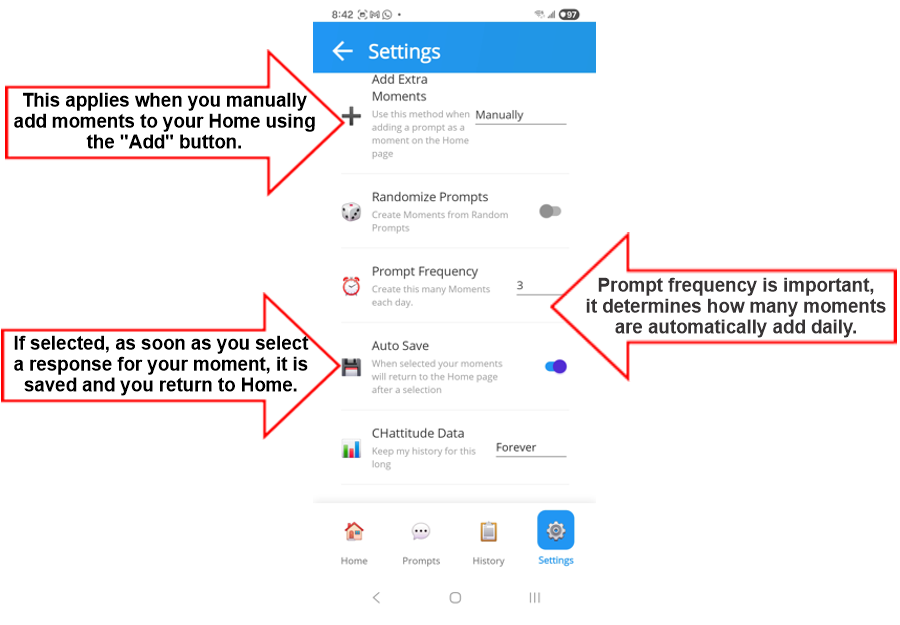
CHattitude's Home page shows you at a glance your progress through your day.

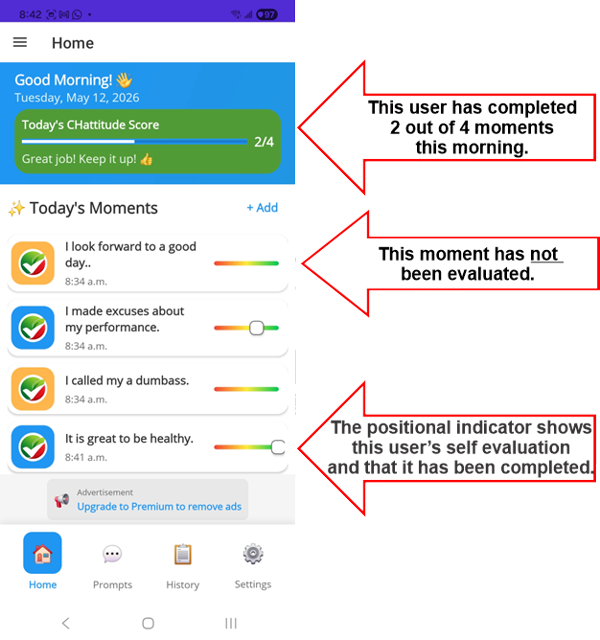
Each daythis app will create a set number of moments from your Prompts.

The number of 'automatic' moments can be adjusted in the settings. You may add additional prompts using the "Add" button.

Prompts may be added randomly, alphabetically, or by usaged.

Home


A moment

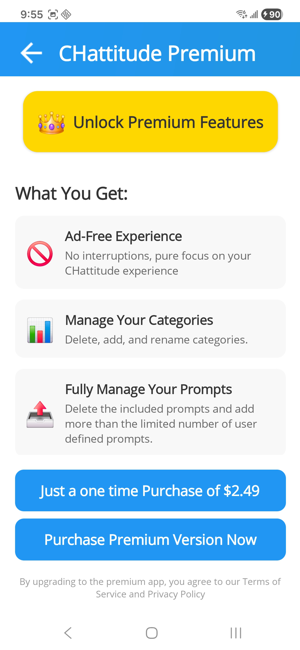
When you select a moment on the Home page, you will be taken to the moment view where you can enter your thought or feeling about this moment as a self evaluation.

If you have already evaluated this moment, then you can view your previous selection and the options that were available to you.


Moment entry

I don't want this prompt today

Recall that prompts are added to your moments randomly, alphabetically, or by usage.

Perhaps today you don't want to engage with a particular prompt. You can choose to remove it and move on to the next moment.


Prompts

Prompts

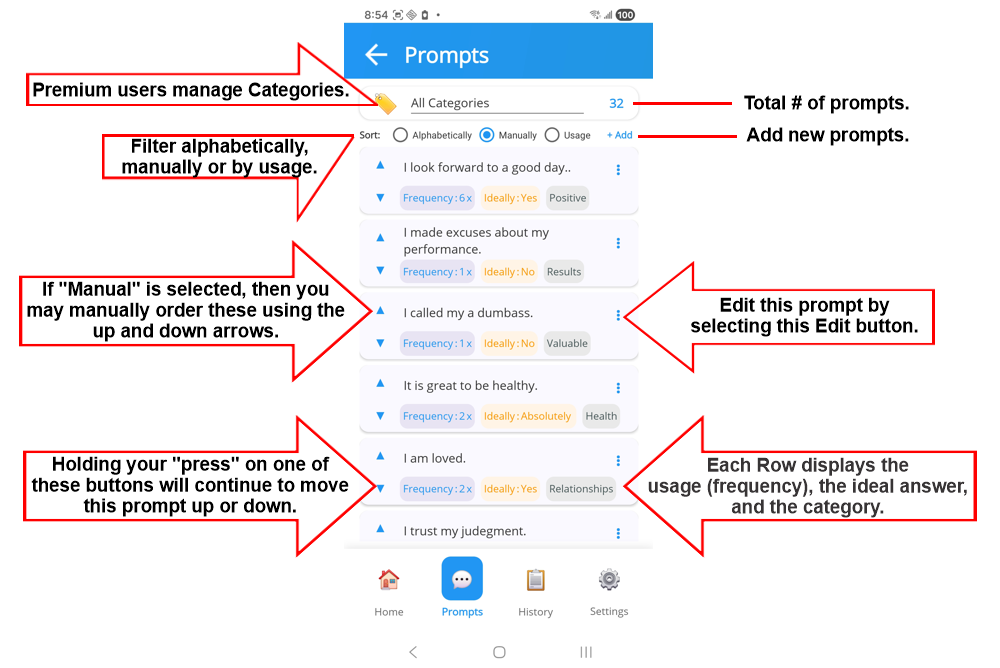
Filter your prompts by Cateogory, and then view prompts:

  • Alphabetical - prompts are listed in alphabetical order.
  • Users may manually order prompts.
  • By Usage - prompts are listed based on how frequently they are used.

Note that the user's daily moments that are obtained from these promopts depend on preferences set in the Settings page.

The Category Icon will open the category management interface.

The Edit Icon will open the edit interface for the selected prompt.


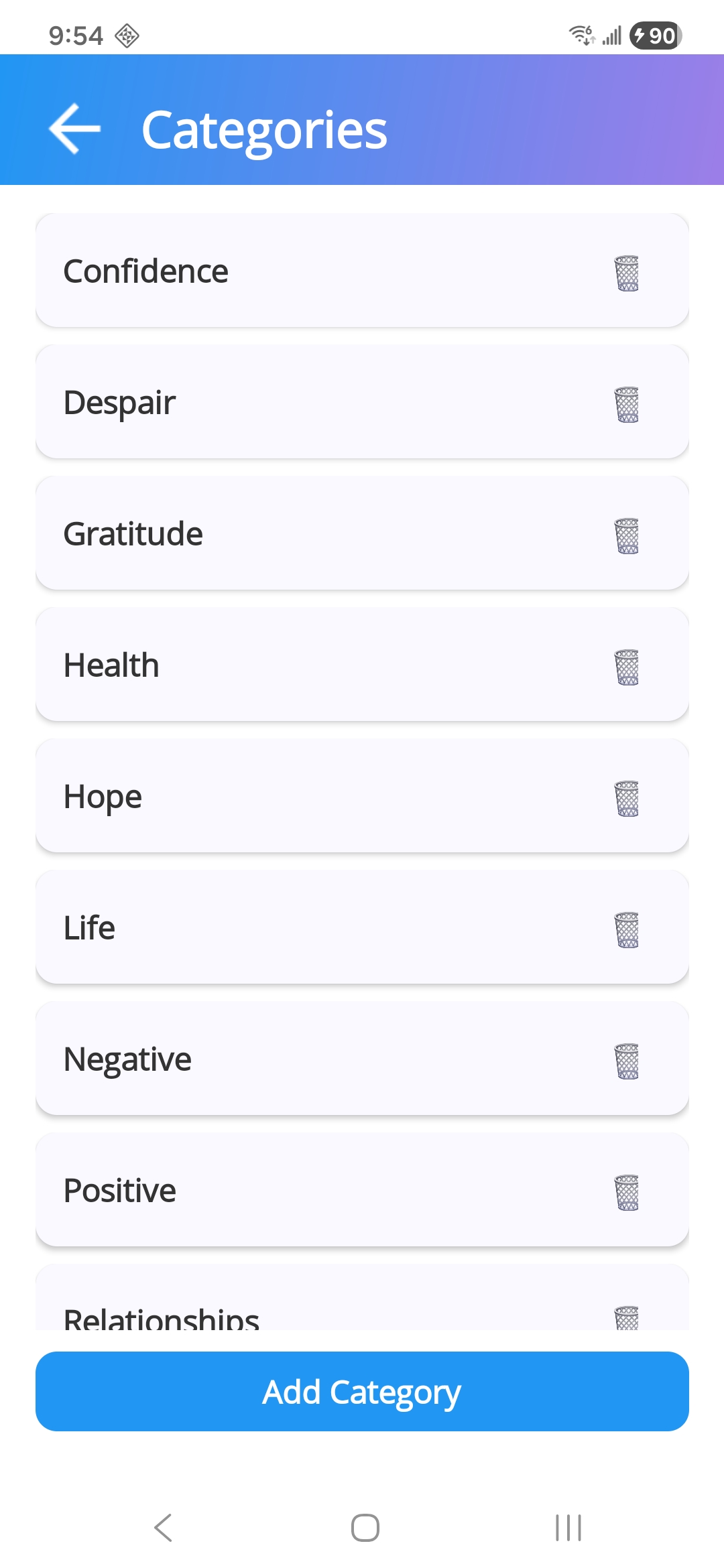
Category Management

Premium users may access this category management feature.

Categories are listed alphabetically in the management interface.

You may add or delete categories as needed.


The Prompt Interface

The Prompt interface

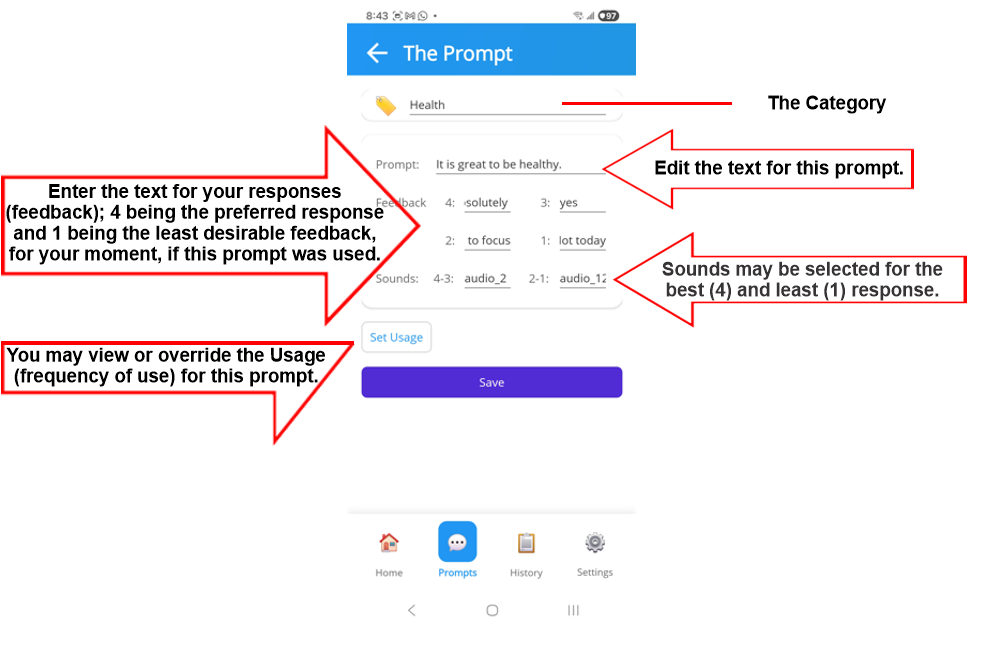
The Prompt response (or Feedback) allows the user to use their own text to identify:

  • a score of 4 - a great moment (choice, habit or attitude)
  • a score of 3 - a good moment (choice, habit or attitude)
  • a score of 2 - a weak moment (choice, habit or attitude)
  • a score of 1 - a poor moment (choice, habit or attitude)


The default text for a score of 4 is "Yes".

The default text for a score of 1 is "No".

History

History

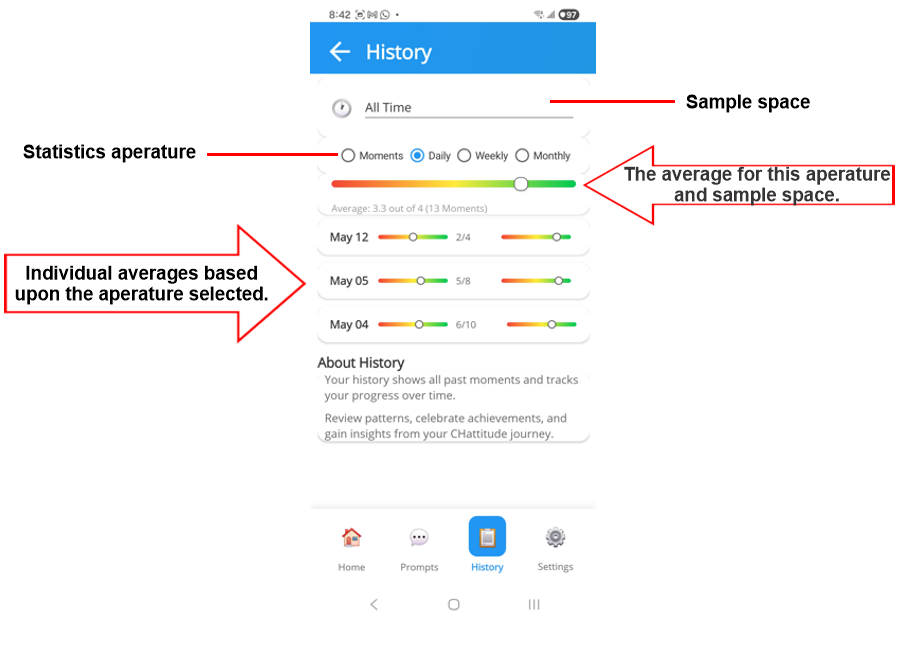
This History interface display statistical patterns based upon your aperature and sample space.

The Sample Space allows you to select from:

  • All Time - all of your moments contained in data.
  • Last 30 days.
  • Last 3 months.
  • Last 6 months.
  • This Year.
The historic data and statistics will be based upon the data set that is selected in the Sample Space.

The Aperature determines the granularity of the data. For example, if you select "Last 30 days" in the Sample Space, then you can select to view the data by "Day", then the average of your moments for the past 30 days is calculated and displayed in the top graph.
Below this graph, the individual averages for each day in which your app was operating will be displayed with 2 graphs; one for the number of moments completed, and the second for the average score (4 representing the ideal).
Settings

Settings

Languages currently supported are:

  • English.
  • French.
  • Spanish.
  • German.
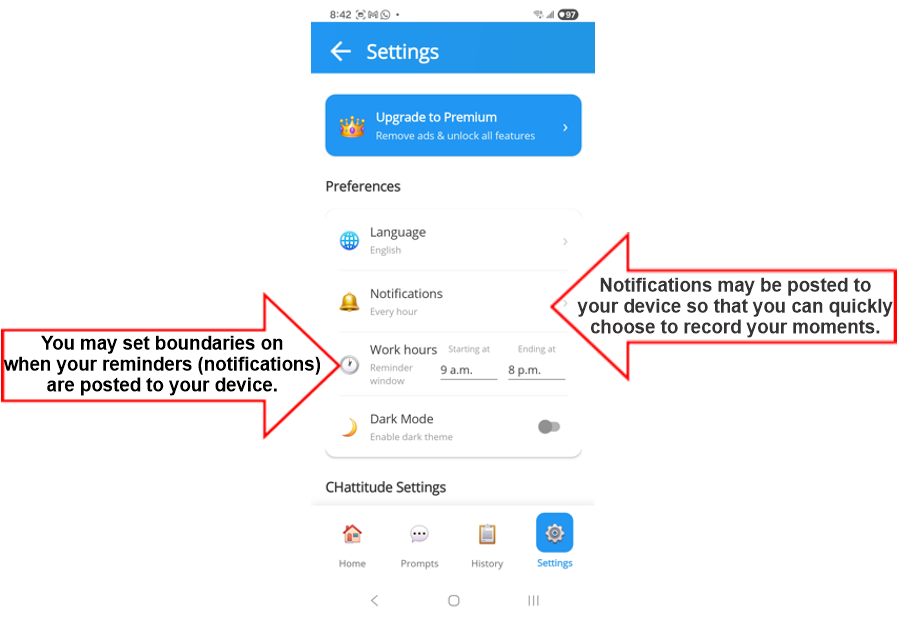
If you choose to have notifications, they will only be sent during the hours set in the "Working hours" setting.

Notifications may be set to:

  • Every 2 hours.
  • Every hour.
  • Every half hour.
  • Last 6 months.
  • Never.
If you choose to have notifications, they will only be sent during the hours set in the "Working hours" setting.


Settings

Additional Settings. Caution must be exercised as these actions are permanent.

CHattitude data - keeps your data:

  • Forever (default and safest option).
  • This year - caution, this cannot be undone.
  • Clear - caution, this will remove all previous data and cannot be undone.

Reset Prompts - this action will reset all of your prompts to the default setting which will effectively remove all of your custom prompts. This action is permanent and cannot be undone.

Reset Categories - this action will reset all of your categories to the default setting which will effectively remove all of your custom categories. This action is permanent and cannot be undone.

Reset Preferences - this will reset all of your preferences to the default setting. This action is permanent and cannot be undone.


Upgrading to the Premium Version

Premium Page

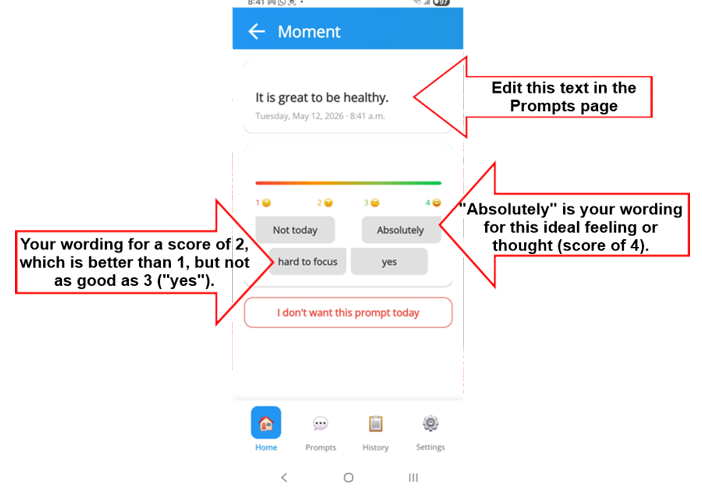
Upgrade for just $2.49.

  • Obtain an Ad-Free Experience.
  • Manage your Categories. With the standard version you must use the predefined categories, and while these are expected to fit most lifestyles, the premium version allows you to create and manage your own categories, such as "Golf", "School", "Sports", "Driving", "Travel", etc..
  • Fully manage your prompts. With the premium version there is no limit to the number of prompts you can create or manage.
  • Backup your data and preferences.